
Moth cleans your Downloads
Set an expiration date on what you download and Moth sends it to the Trash when time is up.
- Free
- macOS 26 or later
- Apple Silicon
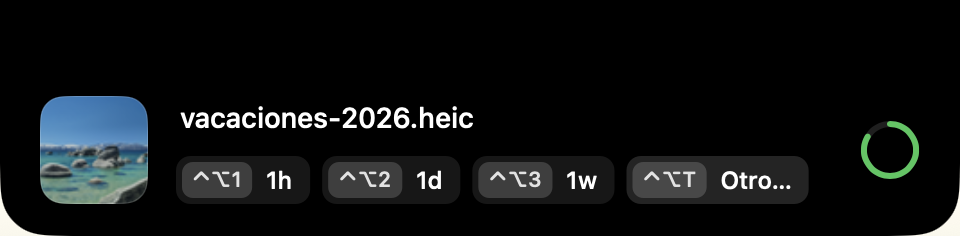
See it in action
a file lands in Downloads → the island appears at the top center → ⌃⌥2 → the file gets a one-day deadline → when it expires, it goes to the Trash.
How it works
- A file arrives. When a download finishes in
~/Downloads, an island appears at the top center with the file name and a preview. - You set a deadline. A keyboard shortcut or a custom duration: one hour, one day, one week or whatever you type.
- When it expires, it goes to the Trash. If you do nothing, the file stays.
Four shortcuts and you're done
| Key | Action |
|---|---|
⌃⌥1 |
Expires in 1 hour |
⌃⌥2 |
Expires in 1 day |
⌃⌥3 |
Expires in 1 week |
⌃⌥T |
Custom duration: 10s, 5m, 2h, 3d, 1w |
| No action (8 s) | The file is kept |
Built to stay out of the way
- Native and tiny. Pure AppKit, no Dock icon, no database. About 10 MB of memory when idle and practically zero wake-ups.
- Safe by design. It never deletes a file without an expiration you chose, never touches anything outside Downloads, and everything goes to the Trash, so you can get it back.
- No settings to manage. Nothing to configure.
Privacy
Everything happens on your Mac. The only network request is the update check, which downloads the project's appcast.xml and sends nothing about you.
Install
Paste this in Terminal:
curl -fsSL https://raw.githubusercontent.com/Andss-ye/moth-releases/main/install.sh | sh
It downloads the latest Moth.dmg, copies Moth to Applications and opens it. Because curl does not mark the download as coming from a browser, macOS shows no warning. Read install.sh first if you like: it is short.
Prefer the DMG?
- Download
Moth.dmg, open it and drag Moth to Applications. - Moth is not notarized by Apple, so macOS blocks it the first time. Click Done, not Move to Trash, then go to System Settings → Privacy & Security, scroll down to the Moth message and click Open Anyway.
- Allow access to the Downloads folder when macOS asks.
Requirements: macOS 26 or later on a Mac with Apple Silicon (M1 or newer). There is no Intel version.
Updates: Moth updates itself with Sparkle: it checks once a day, and every download is verified with an EdDSA signature before it is installed.
FAQ
What happens if I quit Moth?
Moth only deletes while it is running. When you reopen it, it sweeps whatever expired in the meantime, so a deadline is never lost, only delayed.
What if I change my mind?
Everything goes to the Trash. If you restore the file from there, Moth does not delete it again.
What if I modify the file after setting a deadline?
It stops expiring. The deadline is stored on the file itself (extended attribute com.moth.expires) tied to its modification date: there is no database, and it is lost on its own if the file changes or leaves the folder.
Does it work on Intel Macs?
No. Moth is built for Apple Silicon only.
Why does macOS warn me when I install from the DMG?
Moth is not notarized by Apple, which requires a paid developer account. The install command avoids the warning, and updates from inside Moth never show it. If you would rather not run it, that is a fair call.
Can I use it at work?
No. The license is personal, non-commercial freeware: it does not allow use inside a business or organization.
What language is the app in?
For now, Moth's interface is in Spanish.
How do I uninstall it?
Quit Moth from the menu bar and drag it from Applications to the Trash. Files keep a harmless com.moth.expires attribute that you can ignore.